

Is Gamma AI Worth Paying For? An Honest Student Review (2026)
I started using Gamma AI for the same reason most students probably find it: I needed to make a presentation, I was running out of time, and I really did not want to spend another night moving text boxes around in PowerPoint.
After using Gamma to build a class presentation in about 15 minutes, I understood the hype pretty quickly.
But then I had a different question.
Is Gamma AI actually worth paying for as a student?
The free plan is surprisingly useful, so paying is not an automatic yes. And honestly, I do not think every student needs Gamma Plus or Pro.
For occasional class presentations, Gamma’s free plan is probably enough. If you regularly create presentations and want to remove Gamma branding, generate longer decks, and get more AI power, I think Gamma Plus is the best fit for most students. Gamma Pro is powerful, but for the average student it is usually more than you need.
Try Gamma AI for free →
My Honest Experience With Gamma AI as a Student
Before Gamma, presentations were one of those assignments I always underestimated.
The research might be finished. The project might be finished. The report might even be submitted.
Then I would open a blank presentation and realize I still had hours of work ahead of me.
Choose a template. Create the title slide. Decide how many slides I need. Copy information from the report. Shorten it. Find images. Fix the design. Make every slide look consistent.
It was rarely difficult work.
It was just painfully slow.
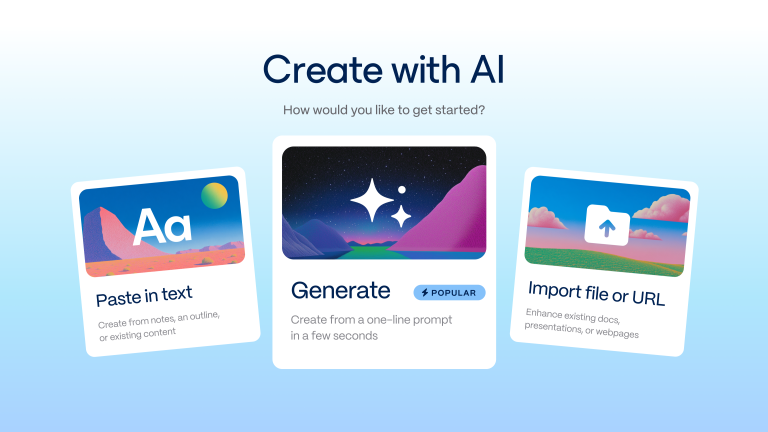
Gamma changed that part of the process for me. I could give it a topic, an outline, or content from an existing project and get a structured presentation instead of a blank slide.
I still had to check the facts, rewrite sections that sounded too generic, and add my own project screenshots. Gamma did not magically do the assignment for me.
But it removed a huge amount of formatting and design work.
That is why I kept using it, and why I eventually started wondering whether the paid version was actually worth the money.
Gamma AI Free vs Paid: What Actually Matters for Students?
This review focuses on whether Gamma’s paid plans are actually worth the money for student presentation work. For the current Gamma student discount, Gamma student plan, Gamma education discount, and whether Gamma is free for students, use my dedicated Gamma AI student discount and pricing guide. That page is the main source on this site for current student pricing and discount status.
For students, though, I think the plan comparison is much simpler than the full feature list makes it look.
| Plan | Best for | My student verdict |
|---|---|---|
| Free | Occasional assignments and trying Gamma | Enough for many students |
| Plus | Students who regularly make presentations | Best value for most frequent users |
| Pro | Heavy users, advanced sharing, branding, and professional work | Usually overkill for normal coursework |
| Ultra | Very high AI usage and access to advanced models | Not something most students need |
The biggest mistake, in my opinion, is assuming you need Pro just because it sounds like the “best” plan.
For student presentations, the question is not which plan has the longest feature list.
The real question is: what is actually slowing you down?
What You Get With Gamma AI Free
Gamma’s free plan is much more useful than I expected.
At the time of writing, Gamma says the Free plan can create up to 10 cards per prompt. It also supports simple presentations, documents, websites, social content, and images.
You can import PDF and PowerPoint files, and Gamma lists export support for PDF, PPTX, PNG, and Google Slides.
For a student making a normal class presentation, that is already a lot.
If you have one presentation this month, need eight or ten slides, and mainly want AI to help you escape the blank-slide problem, I honestly would not rush to pay.
Start with Free.
See whether you actually like Gamma’s card-based presentation style. Try generating a real assignment. Export it. Present with it.
You might discover that the free plan does everything you need.
When Gamma Plus Starts to Make Sense
I think Gamma Plus is the most interesting paid plan for students.
Gamma currently lists up to 20 cards per prompt on Plus, compared with up to 10 on Free. Plus also removes Gamma branding and gives access to more advanced AI image models.
Those features sound simple, but they solve the problems I think frequent student users are most likely to notice.
1. You Make Longer Presentations
Ten cards can be enough for a short class assignment.
But seminar presentations, project reviews, research presentations, and final assignments can easily need more structure.
Being able to generate a longer deck in one prompt is convenient because the AI can plan the full flow together instead of forcing you to build the presentation in smaller pieces.
2. You Want to Remove Gamma Branding
This is probably the clearest reason to upgrade.
For a casual class assignment, Gamma branding might not bother you at all.
For a seminar, portfolio presentation, important university project, internship presentation, or something you are presenting outside class, I can understand wanting a cleaner final result.
It is not about hiding that you used an AI tool. You should still follow your university or instructor’s AI rules.
It is simply about making the presentation feel like your presentation.
3. You Use Gamma Regularly
This is the biggest factor for me.
If Gamma saves you three hours once, paying for it might still feel unnecessary.
If it saves you hours every month across class presentations, project updates, seminar decks, and group assignments, the value equation changes.
That is when a paid plan stops feeling like “another AI subscription” and starts feeling like a productivity tool you actually use.
Try Gamma AI and compare the free plan yourself →
Is Gamma Pro Worth It for Students?
For most students?
Probably not.
And I mean that as a compliment to Gamma Plus, not as criticism of Pro.
Gamma Pro currently adds features such as up to 60 cards per prompt, premium AI image models, custom branding and fonts, detailed analytics, advanced sharing, custom domains, API access, and workspace templates.
Those are strong features.
But ask yourself honestly: do you need presentation analytics for your Tuesday morning class? Do you need API access for a history seminar? Are custom domains important for your group project?
Probably not.
I think Pro starts making more sense for students who are also freelancing, running a student organization, building a startup, working in marketing, creating presentations for clients, or using Gamma as part of professional work.
For normal coursework, I would start with Free and move to Plus if Gamma becomes part of your regular workflow.
What About Gamma Ultra?
Gamma also currently lists an Ultra plan for much higher AI usage and access to its most advanced text, image, and video models.
My honest student review?
Most students can ignore it.
If you already know you are a very heavy Gamma user, you probably do not need me to convince you. But I would not recommend a typical student jump from Free directly to Ultra just because it has the most AI features.
The Features I Would Actually Pay For as a Student
When I look at Gamma’s paid plans from a student perspective, these are the things I think matter most:
- Removing Gamma branding for important presentations
- Generating longer presentations from a single prompt
- More AI capacity when Gamma becomes a regular study tool
- Better image generation options when visuals actually matter
That is basically it.
For students, I would not choose a plan based on the number of enterprise-style features in the comparison table.
I would choose based on how many presentations you make and how much time Gamma saves you.
When I Would Stay on Gamma Free
I would stay on the free plan if:
- You only make a few presentations per semester
- Your presentations are usually short
- You are still testing whether you like Gamma
- Gamma branding does not bother you
- You mainly need help creating the first draft and structure
Honestly, this probably describes a large number of students.
And that is fine.
A tool does not need to be paid to be useful.
When I Think Gamma Plus Is Worth Paying For
I would seriously consider Gamma Plus if:
- You create presentations every month
- You regularly build longer decks
- You use Gamma for university seminars or major projects
- You want presentations without Gamma branding
- You keep running into the limits of the free plan
- Gamma consistently saves you hours
For me, the last point matters most.
I am careful with AI subscriptions because paying for five different tools that I “might use” quickly becomes expensive.
But I look at tools differently when they repeatedly save me real time.
Gamma is one of those tools. Once you decide to use it regularly, better instructions matter too, so I keep a separate list of Gamma AI prompts for students that I use to get stronger first drafts.
Is Gamma AI Better Than Paying for PowerPoint or Canva?
I do not think this is a perfect one-to-one comparison because the tools solve different problems.
PowerPoint gives you extremely detailed slide control. Canva is excellent when you want to manually design something visual. Gamma is the tool I would choose when my biggest problem is time.
That is why my answer changes depending on the assignment.
For a highly customized design project, I might want Canva.
For a presentation with very specific university formatting or advanced animations, PowerPoint can make more sense.
But when I have a report, project, or outline and need to turn it into a good-looking presentation quickly, Gamma is usually the first tool I think about.
I compared these tools in more detail in my Gamma AI vs Canva vs Prezi for students guide. You can also see my full list of the best AI presentation tools for students.
The Biggest Reason I Would Not Pay for Gamma
There is one situation where I definitely would not subscribe.
If I was paying because I thought Gamma would create perfect academic content for me.
It will not.
AI-generated presentation text can still be generic, oversimplified, or wrong. You need to check facts, add your own analysis, and make sure the presentation actually matches your assignment.
I think Gamma is strongest as a presentation creation tool, not as a replacement for understanding your topic.
That distinction matters.
Pay for Gamma because it saves you time building and organizing presentations.
Do not pay because you expect it to do your thinking for you.
My Verdict: Is Gamma AI Worth Paying For?
Yes, Gamma AI can be worth paying for as a student — but I would not recommend the paid plans to everyone.
If you make occasional class presentations, start with Gamma Free. It is already capable enough to show you why the tool is useful, and you may never need to upgrade.
If you regularly make presentations, want to remove Gamma branding, need longer AI-generated decks, and keep using Gamma every month, I think Plus is the most sensible paid option for most students.
Pro is excellent for heavier or more professional use, but I would not tell an average university student to pay for features they probably will not use.
My advice is simple:
Use Gamma Free for your next real presentation. If you finish the project thinking, “I wish I had more of this,” then consider upgrading.
That is a much better reason to pay than subscribing because an AI tool looks impressive on TikTok.
Want to test Gamma on your next presentation?
Start with the free plan, build a real class presentation, and decide whether the paid features actually save you enough time to justify upgrading.
Try Gamma AI →Gamma AI Paid Plans: Frequently Asked Questions
Can students use Gamma AI for free?
Yes. Students can use Gamma’s free plan to create presentations and other content. For the current student-plan status, discount availability, and plan details, see my Gamma AI student pricing and discount guide. This review stays focused on whether upgrading is worth the money.
Is Gamma Plus worth it for students?
I think Gamma Plus is most useful for students who regularly create presentations. The current plan includes longer AI generations of up to 20 cards per prompt, removal of Gamma branding, and access to more advanced AI image models.
Is Gamma Pro worth it for students?
For average coursework, probably not. Pro includes powerful features such as custom branding, detailed analytics, advanced sharing, API access, and workspace templates, but many students will not need them. It can make more sense for students who also freelance, run a startup, or create professional presentations.
Can I export a Gamma presentation on the free plan?
Gamma’s current pricing page lists PDF, PPTX, PNG, and Google Slides exports as included with Free.
Does Gamma Plus remove Gamma branding?
Yes. Gamma currently lists removal of Gamma branding as a Plus feature.
Which Gamma plan is best for students?
For occasional presentations, I recommend Free. For students who regularly use Gamma and want longer generations and no Gamma branding, Plus is my top choice. Pro and Ultra are better suited to advanced or very heavy users.
Should I pay for Gamma AI or use the free version?
Use the free version until you encounter a limitation that is actually affecting your work. If Gamma becomes a regular part of your presentation workflow and repeatedly saves you hours, a paid plan becomes much easier to justify.
Related guides: Read how I made a presentation in 15 minutes with Gamma AI, see how I used Gamma for my Algorithms Seminar presentation, or browse my AI presentation tools for students hub.
Before paying for Gamma, check my Pitch vs Gamma comparison to see whether Pitch’s slide editing and collaboration features fit your assignments better.
Last verified: August 21, 2026.




2 Comments