
Gamma AI for Students: How I Made a Presentation in 15 Minutes
This is my student-focused Gamma AI review based on a real class project where I used Gamma to create a presentation in about 15 minutes. If you are looking for Gamma for school assignments, Gamma AI for student presentations, an AI presentation maker, or one of the best AI presentation tools for students, this is the exact experience that made me start using it regularly.
Gamma AI is worth trying if you need to turn notes, outlines, research summaries, or project reports into clean presentations quickly. It is especially useful for students because it removes the blank-slide problem and helps you focus on the content instead of slide design.
Try Gamma AI here →
My Last-Minute Gamma AI Presentation Story
The final presentation for our project was due the next morning.
And like every student who says “we still have plenty of time,” we somehow ended up starting the night before.
The project itself was finished. The code worked, the report was mostly done, and after weeks of working on it, we were honestly just tired of looking at it.
But the presentation?
That part kept getting pushed off.
At around 10:45 PM, I opened our shared Google Doc and realized we basically had nothing. Just random notes, screenshots, unfinished explanations, and a few bullet points that made sense only because we had been staring at them for weeks.
Normally, this is where the panic starts.
Because presentations always take longer than expected.
You tell yourself it’ll take an hour, then suddenly it’s 2 AM and you’re still moving text boxes around trying to make one slide look less terrible.
I was already mentally preparing for that kind of night when I decided to try something different.
Instead of opening PowerPoint, I opened Gamma.
At that point, I honestly wasn’t expecting much. I thought maybe it would help with templates or design ideas. Something small.
Instead, it completely changed the way I build presentations.
Honestly, after trying several AI presentation tools for students, Gamma was the first one that actually felt useful during a real deadline.
How I Used Gamma AI to Create the Presentation

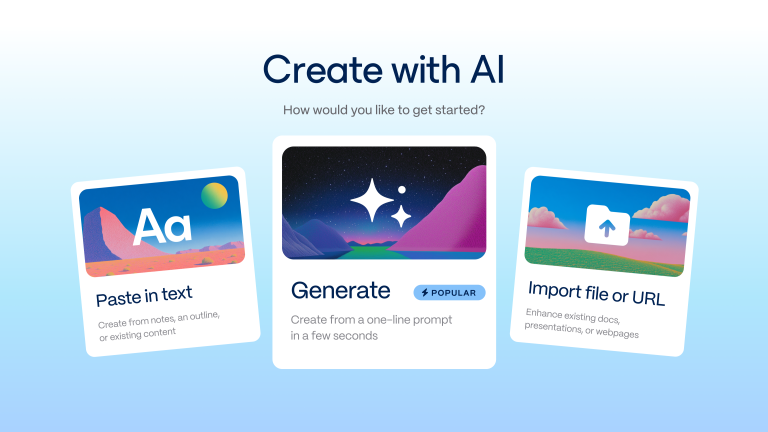
I copied part of our project summary and pasted it into Gamma.
Something simple like:
I later collected the prompt patterns that worked best for me in my Gamma AI prompts for students guide.
“Create a presentation about a machine learning project for students, including the problem, methodology, results, and conclusion.”
Then I clicked generate.
A few seconds later, slides started appearing on the screen.
Not blank slides. Actual slides.
A title page. Structured sections. Clean layouts. Visuals that matched the topic. It already looked more organized than most presentations I had spent hours building manually.
I remember just staring at the screen for a second thinking:
There’s no way this is real.
Why Gamma AI Saved So Much Time
The strange part was how different the whole process felt.
Normally, when I make presentations, I spend most of the time doing things that have nothing to do with the actual presentation. Fixing fonts. Aligning images. Changing colors. Trying to make everything look consistent.
This time, almost all of that was already done.
The structure existed before I even started editing.
So instead of fighting with formatting, I focused on the actual content. I rewrote a few sections to sound more natural, added screenshots from our project, removed a couple of unnecessary slides, and changed a few examples.
That was basically it.
At some point I checked the clock because it genuinely felt wrong.
It had been around fifteen minutes.
And somehow, the presentation was almost finished.
Not “halfway there” finished. Actually finished.
That honestly shocked me more than anything else.
Because I realized most presentations don’t take hours because the ideas are difficult. They take hours because building slides manually is painfully slow.
Gamma removed almost all of that friction.
And that’s why I think tools like this are becoming some of the best AI presentation tools for students right now.

Was the Gamma AI Presentation Good Enough for Class?
The next day was the part I was worried about most.
I thought it would look obvious that we made the presentation at the last minute.
But nobody noticed.
In fact, it ended up being one of the cleanest presentations we submitted that semester. Everything looked consistent, the flow made sense, and for once I wasn’t embarrassed by the design of the slides.
One of the funniest parts is that we spent more time practicing what to say than actually building the presentation itself.
That had literally never happened to me before.
After that project, I kept using Gamma for other assignments.
Not because it magically creates perfect presentations on its own.
But because it removes the part everyone hates.
The blank slide.
The formatting.
The endless design adjustments that somehow eat entire evenings.
And once you experience finishing a presentation in minutes instead of hours, it becomes really hard to go back.
I’ve tried other tools since then, but Gamma still feels like one of the most useful AI tools for student presentations because it focuses on speed without making the slides look generic.
Final Thoughts
I originally opened Gamma because I was desperate to finish a presentation quickly before a deadline.
I didn’t expect it to completely change the way I work on presentations.
Now, whenever I have a class presentation, it’s usually the first tool I open.
Not because it replaces creativity.
Because it removes everything that slows creativity down.
And honestly, that matters a lot more than I expected.
If you’re looking for an AI presentation for students that actually saves time while still making your slides look professional, Gamma is absolutely worth trying.
Gamma AI for Students: Frequently Asked Questions
Is Gamma AI free?
Yes. Gamma offers a free plan that allows you to create AI-powered presentations, documents, and web pages. The free version is a great way for students to try Gamma before deciding whether they need additional premium features. I compare the current plan options in my Gamma AI student pricing guide.
Is Gamma AI worth it for students?
Absolutely. If you regularly create presentations for classes, seminars, or university projects, Gamma is one of the best AI presentation tools for students. It can generate slide decks, organize your content, and create professional-looking presentations in just a few minutes, saving hours of manual work.
Is Gamma better than PowerPoint?
It depends on how you work. PowerPoint gives you complete control over every slide, but it also requires much more time to design presentations. Gamma focuses on speed and AI-assisted creation, making it an excellent PowerPoint alternative for students who want to build modern presentations quickly.
Can Gamma create an entire presentation with AI?
Yes. Gamma can generate a complete presentation from a short prompt, outline, or existing document. It automatically creates sections, layouts, visuals, and formatting, making it one of the most useful AI tools for student presentations.
What makes Gamma different from Canva or Prezi?
Gamma focuses on AI-generated presentations and storytelling, while Canva offers more manual design flexibility and Prezi specializes in zooming, interactive presentations. If your goal is to create a professional presentation as quickly as possible, Gamma is often the easiest option.
Related: Read my full comparison of Gamma vs Canva vs Prezi for Students.
Can I use Gamma for school or university presentations?
Yes. Gamma is perfect for school assignments, university projects, research presentations, business pitches, and seminar presentations. Many students use it to turn their notes into polished presentations without spending hours designing slides.
Is Gamma one of the best AI presentation tools for students?
In my experience, yes. After testing several AI presentation tools for students, Gamma consistently stood out because it combines fast AI generation with clean, modern designs. Instead of starting from a blank slide, you can focus on your ideas while Gamma handles the presentation structure and layout.
Does Gamma work for group projects?
Yes. Gamma includes collaboration features that make it easy to work with classmates on the same presentation. Team members can edit content together, making it a practical choice for university group assignments.
Can I export Gamma presentations?
Yes. Gamma presentations can be shared online, presented directly from the platform, or exported in supported formats depending on your plan. This makes it easy to present in class or share your work with professors and classmates.
What is the best AI presentation tool for students?
There isn’t a single answer because it depends on your needs. However, if you’re looking for an AI presentation for students that is fast, easy to use, and produces professional-looking slides, Gamma is one of the strongest options available. If you’d like to compare it with other tools, check out my guide to the Best AI Presentation Tools for Students.
Gamma is not the only strong option for student presentations. My Pitch vs Gamma comparison for students explains when Pitch is the better choice for slide control and group work.
Last verified: August 21, 2026.



5 Comments